Sign every page.
Finish the whole batch.
Bulk PDF signing with your DSC token, on your Windows computer.
Explore Pro Signer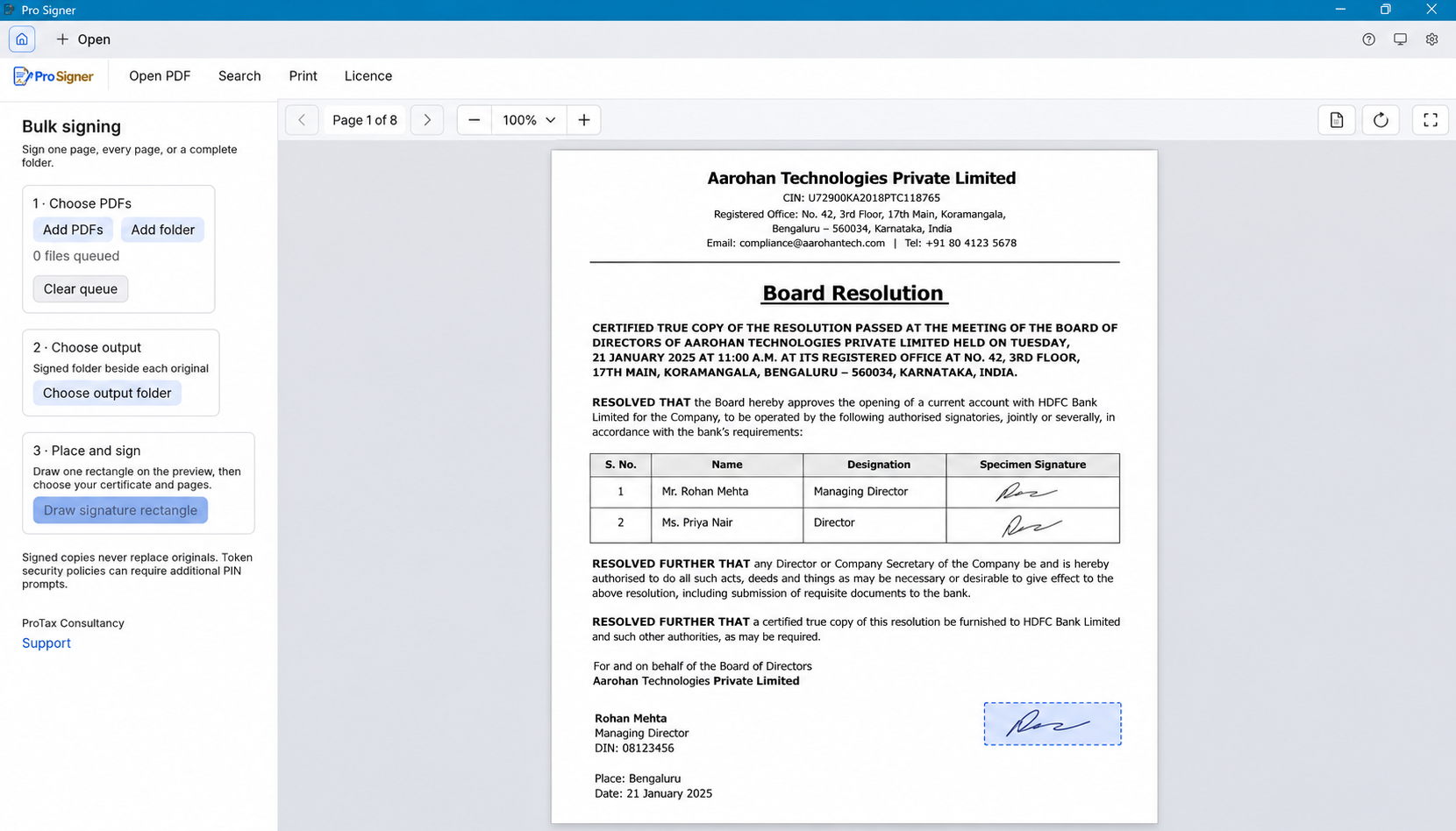
HOW IT WORKS
From PDFs to signed copies
- Choose your PDFs
Open one document, add several files, or select a folder.
- Draw the signature area
Place a rectangle and choose all pages, selected pages, or a range.
- Choose your DSC and sign
Review the batch, enter your PIN when requested, and save signed copies.
WHY PRO SIGNER
A focused PDF viewer and digital signer
- One placement, every selected page
- Apply the signature rectangle across your chosen pages and PDF files in one signing run.
- Keep documents local
- PDF processing and DSC signing happen on your computer. The activation service handles the licence.
- Read without a subscription
- Open PDFs, search, navigate, zoom and print. Viewing remains free.
- Use your own token
- Choose a Windows signing certificate or configure your token’s PKCS#11 driver.
For audit reports, financial statements, invoices, certificates and other PDF documents your team signs in bulk.
SIMPLE LICENSING
Choose the setup that fits your team
Every option includes the focused Windows PDF viewer and bulk DSC signing. Taxes are shown separately at checkout.
ONE WORKSTATION
Single seat
For one Windows computer and one signer.
₹2,000 + 18% GST
Usual price ₹5,000 + GST
GST ₹360 · Pay ₹2,360
- Sign all selected pages in one run
- Use ProxKey or another supported DSC token
- Save signed copies beside your originals
- Free PDF viewing after signing access ends
Choose single seat →RECOMMENDED FOR TEAMS
TWO WORKSTATIONS
Dual seat
We issue two independent licence keys, one for each computer.
₹3,500 + 18% GST
GST ₹630 · Pay ₹4,130
- Two one-computer Pro Signer licences
- Ideal for an owner and an accounts user
- Place one signature rectangle across pages
- Each computer activates independently
Choose dual seat →
THREE OR MORE
Bulk team
A tailored licence plan for larger teams.
Custom quote
Tell us how many computers you need.
- One conversation for your whole team
- Flexible licence quantity and duration
- Guidance for token and driver setup
- Manual licence options available
Talk to ProTax →GET STARTED IN THREE STEPS
From payment to your first signed PDF
- 01
Pick a licenceComplete the secure Cashfree checkout for your chosen setup.
- 02
Receive your keyAfter payment is confirmed, the licence is sent to the purchase email.
- 03
Activate on WindowsEnter the email and key once. Pro Signer links the licence to that computer.
Questions about bulk DSC signing
Can I sign all PDF pages in one run?
Yes. Draw the signature rectangle, choose all pages or a page range, and apply a digital signature to each selected page.
Can I bulk sign multiple PDFs or a folder?
Yes. Add multiple PDF files or choose a folder, review the page and placement settings, and run the batch. Signed copies are saved separately from the originals.
Does Pro Signer work offline?
PDF viewing and licensed PDF signing run locally on your Windows computer. Purchase and first activation need internet.
How do I activate my licence after payment?
After Cashfree confirms payment, your licence key is emailed to your purchase address. Install Pro Signer, open Licence → Activate, enter that email and key, and activate online. The app sends its Computer ID automatically; you do not need to find or enter it at checkout.
Will ProxKey and other DSC tokens work?
Pro Signer supports Windows certificate providers and PKCS#11 token drivers. Install your token manufacturer’s driver. ProTax can help check your specific token and driver; PIN prompts can depend on the token’s security policy.
What happens when the annual licence expires?
PDF viewing remains free. Signing locks until you renew. The licence covers one computer for one year from confirmed payment.
Does the price include a DSC certificate?
The subscription is for Pro Signer software. Use your own valid digital signature certificate and token.